Hi,
Here is the Procedure to load the sql data to excel with out writing lot of code
1)In Excel Click the Menu Data -> ImportExternalData -> NewDataBaseQuery
2)You will get the window Choose DataSource. Select New Datasource -> click OK
3)In Create New Data Source, give the name for the Datasource .Select the driver as SqlServer in the driver type.Click connect
4)Sql Server Login window opens ,Specify the Server Name.Click options Select the Database by default it will assign Master Database .Click Ok
5)Now the datasource will be connected.Select the table name to import your data in to excel.Click OK
6)Query Wizard Opens to select columns
7)Click the option .In the Table Options window there is a option to list only the tables,views, systemTables.Choose as per ur need.In the Owner select dbo.which excludes system tables.Click Next.Click Next
8)In query wizard- finish select the option view data or edit query in Microsoft Query.click Finish.
9)To execute your procedure click on File-> Execute Sql -> select Procedure
10)To import the data click File -> cancel and return to Microsoft excel
Thursday, January 29, 2009


Interface and abstract C#
Hi,
Here is the situation of using abstract vs interface . you may get some basic idea of using interface and abstract
Consider about the Content Management system we generalize the content as Articles,Blogs,Reviews
Interface Vs Abstract

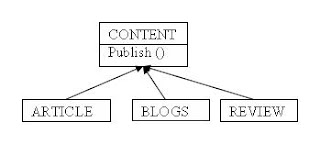
Now Consider Content Contains behavior named publish . If the Publish contain some default behavior then the option would be abstract. If the publish is derived and make their own implementation, then no need to implement in base .In this situation the option would be Interface.
If I made content class as Interface then it is difficult to make changes in base class because if I add new method or property in content interface then I have to implement new method in every derive class. This can be overcome in abstract class by creating new method not an abstract type.
In terms of speed abstract is fast then interface because interface requires extra in-direction.
Here is the situation of using abstract vs interface . you may get some basic idea of using interface and abstract
Consider about the Content Management system we generalize the content as Articles,Blogs,Reviews
Interface Vs Abstract

Now Consider Content Contains behavior named publish . If the Publish contain some default behavior then the option would be abstract. If the publish is derived and make their own implementation, then no need to implement in base .In this situation the option would be Interface.
If I made content class as Interface then it is difficult to make changes in base class because if I add new method or property in content interface then I have to implement new method in every derive class. This can be overcome in abstract class by creating new method not an abstract type.
In terms of speed abstract is fast then interface because interface requires extra in-direction.
Dynamic GridView C#
Hi,
Here is the code to create dynamic gridview with the styles applied
SqlConnection con = new SqlConnection(ConfigurationManager.ConnectionStrings["Sql"].
ConnectionString);
con.Open();
SqlCommand com = new SqlCommand("GetArticles", con);
com.CommandType = CommandType.StoredProcedure;
SqlDataAdapter ada = new SqlDataAdapter(com);
DataSet ds = new DataSet();
ada.Fill(ds);
for (int i = 0; i <>
{
if (ds.Tables[i].Rows.Count > 0)
{
GridView gvDynamicArticle = new GridView();
gvDynamicArticle.Width = Unit.Pixel(700);
gvDynamicArticle.BorderWidth = Unit.Pixel(0);
gvDynamicArticle.Caption = "
gvDynamicArticle.AutoGenerateColumns = false;
gvDynamicArticle.AlternatingRowStyle.BackColor = Color.Brown;
gvDynamicArticle.ShowFooter = true;
TemplateField tf = null;
tf = new TemplateField();
tf.HeaderTemplate = new DynamicGridViewTextTemplate("ArticleID", DataControlRowType.Header);
tf.ItemTemplate = new DynamicGridViewTextTemplate("ArticleID", DataControlRowType.DataRow);
tf.FooterTemplate = new DynamicGridViewTextTemplate(DataControlRowType.Footer, ds.Tables[i].Rows.Count);
gvDynamicArticle.Columns.Add(tf);
tf = new TemplateField();
tf.HeaderTemplate = new DynamicGridViewTextTemplate("Title", DataControlRowType.Header);
tf.ItemTemplate = new DynamicGridViewTextTemplate("Title", DataControlRowType.DataRow);
gvDynamicArticle.Columns.Add(tf);
tf = new TemplateField();
tf.HeaderTemplate = new DynamicGridViewTextTemplate("Description", DataControlRowType.Header);
tf.ItemTemplate = new DynamicGridViewTextTemplate("Description", DataControlRowType.DataRow);
gvDynamicArticle.Columns.Add(tf);
tf = new TemplateField();
tf.HeaderTemplate = new DynamicGridViewURLTemplate("Title", "URL", DataControlRowType.Header);
tf.ItemTemplate = new DynamicGridViewURLTemplate("Title", "URL", DataControlRowType.DataRow);
gvDynamicArticle.Columns.Add(tf);
tf = new TemplateField();
tf.HeaderTemplate = new DynamicGridViewTextTemplate("Author", DataControlRowType.Header);
tf.ItemTemplate = new DynamicGridViewTextTemplate("CreatedBy", DataControlRowType.DataRow);
gvDynamicArticle.Columns.Add(tf);
gvDynamicArticle.DataSource = ds.Tables[i];
gvDynamicArticle.DataBind();
phDynamicGridHolder.Controls.Add(gvDynamicArticle);
}
}
}
}
public class DynamicGridViewTextTemplate : ITemplate
{
string _ColName;
DataControlRowType _rowType;
int _Count;
public DynamicGridViewTextTemplate(string ColName, DataControlRowType RowType)
{
_ColName = ColName;
_rowType = RowType;
}
public DynamicGridViewTextTemplate(DataControlRowType RowType, int ArticleCount)
{
_rowType = RowType;
_Count = ArticleCount;
}
public void InstantiateIn(System.Web.UI.Control container)
{
switch (_rowType)
{
case DataControlRowType.Header:
Literal lc = new Literal();
lc.Text = "" + _ColName + "";
container.Controls.Add(lc);
break;
case DataControlRowType.DataRow:
Label lbl = new Label();
lbl.DataBinding += new EventHandler(this.lbl_DataBind);
container.Controls.Add(lbl);
break;
case DataControlRowType.Footer:
Literal lc1 = new Literal();
lc1.Text = " ";
container.Controls.Add(lc1);
break;
default:
break;
}
}
private void lbl_DataBind(Object sender, EventArgs e)
{
Label lbl = (Label)sender;
GridViewRow row = (GridViewRow)lbl.NamingContainer;
lbl.Text =DataBinder.Eval(row.DataItem, _ColName).ToString();
}
}
public class DynamicGridViewURLTemplate : ITemplate
{
string _ColNameText;
string _ColNameURL;
DataControlRowType _rowType;
public DynamicGridViewURLTemplate(string ColNameText, string ColNameURL, DataControlRowType RowType)
{
_ColNameText = ColNameText;
_rowType = RowType;
_ColNameURL = ColNameURL;
}
public void InstantiateIn(System.Web.UI.Control container)
{
switch (_rowType)
{
case DataControlRowType.Header:
Literal lc = new Literal();
lc.Text = "" + _ColNameURL + "";
container.Controls.Add(lc);
break;
case DataControlRowType.DataRow:
HyperLink hpl = new HyperLink();
hpl.Target = "_blank";
hpl.DataBinding += new EventHandler(this.hpl_DataBind);
container.Controls.Add(hpl);
break;
default:
break;
}
}
private void hpl_DataBind(Object sender, EventArgs e)
{
HyperLink hpl = (HyperLink)sender;
GridViewRow row = (GridViewRow)hpl.NamingContainer;
hpl.NavigateUrl = DataBinder.Eval(row.DataItem, _ColNameURL).ToString();
hpl.Text = "";
}
Here is the code to create dynamic gridview with the styles applied
SqlConnection con = new SqlConnection(ConfigurationManager.ConnectionStrings["Sql"].
ConnectionString);
con.Open();
SqlCommand com = new SqlCommand("GetArticles", con);
com.CommandType = CommandType.StoredProcedure;
SqlDataAdapter ada = new SqlDataAdapter(com);
DataSet ds = new DataSet();
ada.Fill(ds);
for (int i = 0; i <>
{
if (ds.Tables[i].Rows.Count > 0)
{
GridView gvDynamicArticle = new GridView();
gvDynamicArticle.Width = Unit.Pixel(700);
gvDynamicArticle.BorderWidth = Unit.Pixel(0);
gvDynamicArticle.Caption = "
" + ds.Tables[i].Rows[0]["Category"].ToString() + " Articles
";gvDynamicArticle.AutoGenerateColumns = false;
gvDynamicArticle.AlternatingRowStyle.BackColor = Color.Brown;
gvDynamicArticle.ShowFooter = true;
TemplateField tf = null;
tf = new TemplateField();
tf.HeaderTemplate = new DynamicGridViewTextTemplate("ArticleID", DataControlRowType.Header);
tf.ItemTemplate = new DynamicGridViewTextTemplate("ArticleID", DataControlRowType.DataRow);
tf.FooterTemplate = new DynamicGridViewTextTemplate(DataControlRowType.Footer, ds.Tables[i].Rows.Count);
gvDynamicArticle.Columns.Add(tf);
tf = new TemplateField();
tf.HeaderTemplate = new DynamicGridViewTextTemplate("Title", DataControlRowType.Header);
tf.ItemTemplate = new DynamicGridViewTextTemplate("Title", DataControlRowType.DataRow);
gvDynamicArticle.Columns.Add(tf);
tf = new TemplateField();
tf.HeaderTemplate = new DynamicGridViewTextTemplate("Description", DataControlRowType.Header);
tf.ItemTemplate = new DynamicGridViewTextTemplate("Description", DataControlRowType.DataRow);
gvDynamicArticle.Columns.Add(tf);
tf = new TemplateField();
tf.HeaderTemplate = new DynamicGridViewURLTemplate("Title", "URL", DataControlRowType.Header);
tf.ItemTemplate = new DynamicGridViewURLTemplate("Title", "URL", DataControlRowType.DataRow);
gvDynamicArticle.Columns.Add(tf);
tf = new TemplateField();
tf.HeaderTemplate = new DynamicGridViewTextTemplate("Author", DataControlRowType.Header);
tf.ItemTemplate = new DynamicGridViewTextTemplate("CreatedBy", DataControlRowType.DataRow);
gvDynamicArticle.Columns.Add(tf);
gvDynamicArticle.DataSource = ds.Tables[i];
gvDynamicArticle.DataBind();
phDynamicGridHolder.Controls.Add(gvDynamicArticle);
}
}
}
}
public class DynamicGridViewTextTemplate : ITemplate
{
string _ColName;
DataControlRowType _rowType;
int _Count;
public DynamicGridViewTextTemplate(string ColName, DataControlRowType RowType)
{
_ColName = ColName;
_rowType = RowType;
}
public DynamicGridViewTextTemplate(DataControlRowType RowType, int ArticleCount)
{
_rowType = RowType;
_Count = ArticleCount;
}
public void InstantiateIn(System.Web.UI.Control container)
{
switch (_rowType)
{
case DataControlRowType.Header:
Literal lc = new Literal();
lc.Text = "" + _ColName + "";
container.Controls.Add(lc);
break;
case DataControlRowType.DataRow:
Label lbl = new Label();
lbl.DataBinding += new EventHandler(this.lbl_DataBind);
container.Controls.Add(lbl);
break;
case DataControlRowType.Footer:
Literal lc1 = new Literal();
lc1.Text = " ";
container.Controls.Add(lc1);
break;
default:
break;
}
}
private void lbl_DataBind(Object sender, EventArgs e)
{
Label lbl = (Label)sender;
GridViewRow row = (GridViewRow)lbl.NamingContainer;
lbl.Text =DataBinder.Eval(row.DataItem, _ColName).ToString();
}
}
public class DynamicGridViewURLTemplate : ITemplate
{
string _ColNameText;
string _ColNameURL;
DataControlRowType _rowType;
public DynamicGridViewURLTemplate(string ColNameText, string ColNameURL, DataControlRowType RowType)
{
_ColNameText = ColNameText;
_rowType = RowType;
_ColNameURL = ColNameURL;
}
public void InstantiateIn(System.Web.UI.Control container)
{
switch (_rowType)
{
case DataControlRowType.Header:
Literal lc = new Literal();
lc.Text = "" + _ColNameURL + "";
container.Controls.Add(lc);
break;
case DataControlRowType.DataRow:
HyperLink hpl = new HyperLink();
hpl.Target = "_blank";
hpl.DataBinding += new EventHandler(this.hpl_DataBind);
container.Controls.Add(hpl);
break;
default:
break;
}
}
private void hpl_DataBind(Object sender, EventArgs e)
{
HyperLink hpl = (HyperLink)sender;
GridViewRow row = (GridViewRow)hpl.NamingContainer;
hpl.NavigateUrl = DataBinder.Eval(row.DataItem, _ColNameURL).ToString();
hpl.Text = "
" + DataBinder.Eval(row.DataItem, _ColNameText).ToString() + "
}
Tuesday, December 30, 2008
C# Questions
Hi
Here is the basic question which may get confused at some times
++a it increments the value and then it will assign where as a++ it will assign the value and then it increments
int a = 2;
int b = ++a;
Response.Write(b+","+a);
Result:
b : 3
a : 3
int a=2 ;
int b =a++;
Response.write(b+","+a);
Result:
b : 2
a : 3
?? is the operator chks for the null if both c&f are null it results as -1 or else it results first non null value
int? c = 20;
int? f = null ;
int d = c ?? f ?? -1;
Response.Write(d);
Result:
d : 20
int? c = null;
int? f = null;
int d = c ?? f ?? -1;
Response.write(d);
Result:
d : -1;
Convert to binary and left shift bit by 4 digits and then conver to numeric number.Shortcut method is 1*4*4.
int i = 1;
int j = i <<4
Response.Write(j);
Result:
j : 16
Convert to binary and right shift by 2 digits and convert to numeric number .Shortcut Method is i =8 then 8/2 = 4/2 = 2
int i = 8;
int j = i >> 2;
Response.Write(j);
Result:
j : 2
Here is the basic question which may get confused at some times
++a it increments the value and then it will assign where as a++ it will assign the value and then it increments
int a = 2;
int b = ++a;
Response.Write(b+","+a);
Result:
b : 3
a : 3
int a=2 ;
int b =a++;
Response.write(b+","+a);
Result:
b : 2
a : 3
?? is the operator chks for the null if both c&f are null it results as -1 or else it results first non null value
int? c = 20;
int? f = null ;
int d = c ?? f ?? -1;
Response.Write(d);
Result:
d : 20
int? c = null;
int? f = null;
int d = c ?? f ?? -1;
Response.write(d);
Result:
d : -1;
Convert to binary and left shift bit by 4 digits and then conver to numeric number.Shortcut method is 1*4*4.
int i = 1;
int j = i <<4
Response.Write(j);
Result:
j : 16
Convert to binary and right shift by 2 digits and convert to numeric number .Shortcut Method is i =8 then 8/2 = 4/2 = 2
int i = 8;
int j = i >> 2;
Response.Write(j);
Result:
j : 2
Monday, December 29, 2008
WebCustom Control VS WebUser Control
Here is the steps to create the custom control.To implement this create two projects
To create Custom Control
1. On the File menu, point to New, and then click Project.The New Project dialog box appears.
2. In the ProjectTypes pane, choose either Visual Basic Projects or Visual C# Projects. Select Web Control Library in the Templates pane.
3. Change the Name to CustomLabel and click OK. The new project is created, and WebCustomControl1 opens in the Code Editor. Code for a custom Label control is included in the Web Control Library template by default.
4. On the Build menu, click Build CustomLabel to compile the control.The control is compiled as CustomLabel.dll. By default, it is created in the Bin folder inside the CustomLabel project folder.
5. Save the file.Now the Default Label is created
To create WebForm
1)On the File menu, point to Add Project, and then click New Project.The Add New Project dialog box appears.
2) In the Project Types pane, choose either Visual Basic Projects or Visual C# Projects. Select ASP.NET Web Application in the Templates pan
3)Click OK.
The new project is created
Adding Control to the Toolbox:
1)Right click on the ToolBox,Select Choose Item
2)You will find the .netFrameWorkComponent tab, select Browse and map the webusercontrol dll
3)Click Ok
4)Now You can find the WebuserControl in the tool box .
5)Double Click on the control or register the control with the following Tag
<%@ Register Assembly="CustomLabel " Namespace="CustomLabel " TagPrefix="cc1" %>
6)Now Run Your Project
Web User Controls vs. Web Custom Controls
Web User Control:
1)Easier to Create.
2)Limited support for consumers who use a visual design tool.
3)A separate copy of the control is required in each application.
4)Cannot be added to the Toolbox in Visual Studio.
5)Good for static layout.
Web Custom Controls
1)Harder to create.
2)Full visual design tool support for consumers.
3)Only a single copy of the control is required, in the global assembly cache.
4)Can be added to the Toolbox in Visual Studio.
5)Good for dynamic layout.
To create Custom Control
1. On the File menu, point to New, and then click Project.The New Project dialog box appears.
2. In the ProjectTypes pane, choose either Visual Basic Projects or Visual C# Projects. Select Web Control Library in the Templates pane.
3. Change the Name to CustomLabel and click OK. The new project is created, and WebCustomControl1 opens in the Code Editor. Code for a custom Label control is included in the Web Control Library template by default.
4. On the Build menu, click Build CustomLabel to compile the control.The control is compiled as CustomLabel.dll. By default, it is created in the Bin folder inside the CustomLabel project folder.
5. Save the file.Now the Default Label is created
To create WebForm
1)On the File menu, point to Add Project, and then click New Project.The Add New Project dialog box appears.
2) In the Project Types pane, choose either Visual Basic Projects or Visual C# Projects. Select ASP.NET Web Application in the Templates pan
3)Click OK.
The new project is created
Adding Control to the Toolbox:
1)Right click on the ToolBox,Select Choose Item
2)You will find the .netFrameWorkComponent tab, select Browse and map the webusercontrol dll
3)Click Ok
4)Now You can find the WebuserControl in the tool box .
5)Double Click on the control or register the control with the following Tag
<%@ Register Assembly="CustomLabel " Namespace="CustomLabel " TagPrefix="cc1" %>
6)Now Run Your Project
Web User Controls vs. Web Custom Controls
Web User Control:
1)Easier to Create.
2)Limited support for consumers who use a visual design tool.
3)A separate copy of the control is required in each application.
4)Cannot be added to the Toolbox in Visual Studio.
5)Good for static layout.
Web Custom Controls
1)Harder to create.
2)Full visual design tool support for consumers.
3)Only a single copy of the control is required, in the global assembly cache.
4)Can be added to the Toolbox in Visual Studio.
5)Good for dynamic layout.
Sunday, December 28, 2008
How to get the value between from date and to date in sql?
How to get the value between from date and to date in sql?
Consider the Table Employee has the following fields such as EId,Name,FromDate,ToDate
Suppose If u want to calculate the employee working days the follwing query results
Select * from Emp Where FromDate Between '2008-04-15 16:40:00' and '2008-04-15 18:47:0' and TODate Between '2008-04-15 00:00:00 and '2008-04-15 00:00:00'
Consider the Table Employee has the following fields such as EId,Name,FromDate,ToDate
Suppose If u want to calculate the employee working days the follwing query results
Select * from Emp Where FromDate Between '2008-04-15 16:40:00' and '2008-04-15 18:47:0' and TODate Between '2008-04-15 00:00:00 and '2008-04-15 00:00:00'
Sunday, December 21, 2008
How to know how many tables contains same column in a database
How to know how many tables contains same column in a database?
Select Count (*) as counter from Syscolumn Where(name ='ColumnName')
Select Count (*) as counter from Syscolumn Where(name ='ColumnName')
Subscribe to:
Posts (Atom)